Short evaluation window
Terms checked September 19, 2026
Cloudways Free Trial 2026: 3 Days, No Card — What to Test Before You Pay
Affiliate disclosure: If you sign up through an offer link, I may earn a commission at no extra cost to you. Cloudways controls trial eligibility, pricing and final terms.
Cloudways gives you 3 days to try Flexible or Autonomous without adding a credit card. Separately, I tested BLOGGINGSTART on July 23, 2026 and saw a $30 credit in my account. Treat that as firsthand evidence, not a guarantee for every signup.
Start 3-Day Trial & Try the $30 CodeNo card to start. Promo eligibility and value can change.
3 3-day hosting trial⊘ No card to start✓ Flexible + Autonomous
The short answer
Cloudways free trial at a glance
You get 3 days to try Cloudways without a credit card. Flexible is for people who want more server and application control; Autonomous is aimed at WordPress and WooCommerce users who want Cloudways to handle more of the infrastructure.
Needed to start
Flexible or Autonomous
Upgrade only if it fits
I checked the standard trial rules against Cloudways' Flexible guide, Autonomous guide and getting-started FAQ on September 19, 2026. My $30 promo-code evidence is from July 23, 2026.
Pick the right trial first
Cloudways Flexible vs. Autonomous free trial
The trial length is the same, but you are testing two different hosting experiences. Choose the one that matches what you would actually use after the free period.
Cloudways Flexible
Best when you want managed cloud hosting with more direct control over your server and applications.
- Launch a server and deploy an application
- Test WordPress and other supported applications
- Try a self-service website migration
- Choose from available server and region options
- Upgrade later to keep the server
Cloudways Autonomous
Best when your focus is WordPress or WooCommerce and you prefer Cloudways to manage more of the underlying infrastructure.
- Choose WordPress or WooCommerce
- Cloudways handles infrastructure setup
- Designed around automatic scaling
- Cloudways currently says all regions are available during the trial
- Trial resources are limited
Important billing difference: Cloudways says an Autonomous trial is automatically upgraded after 3 days only when a payment method was already attached to the account before the trial started. If you do not want to continue, delete the trial application or unsubscribe before expiry.
Before you start
Cloudways free trial limitations you should know
The free trial is useful, but it is not unrestricted. Knowing the limits before you launch helps you avoid wasting a short evaluation window.
- One Flexible server per account: Cloudways currently limits the 3-day trial to one server.
- No server cloning during the Flexible trial: cloning would create another server, so Cloudways disables it until upgrade.
- Autonomous resources are limited: if you exhaust them, the application can stop before the 3 days are over.
- Managed migration is not available during the trial: Cloudways says you need to upgrade before requesting staff-managed migration.
- Paid add-ons are separate: do not assume every add-on is included because the hosting trial is free.
Current Autonomous trial allowance
| Resource | Current trial allowance |
|---|---|
| Websites | 1 |
| Baseline autoscale servers | 1 |
| Bandwidth | 150 GB |
| Disk space | 20 GB |
| Visits | Unmetered |
| PHP workers | 100 per server |
| Trial price | $0 for 3 days |
Cloudways' current Autonomous pricing section lists 1 website, 1 baseline autoscale server, 150 GB bandwidth, 20 GB disk space, unmetered visits and 100 PHP workers per server for the $0 three-day trial. Check the live plan summary before launch because allowances can change.
Best way to use the trial
Prepare before you create the Flexible trial server
Cloudways says the Flexible countdown starts when the trial server is created. Have your backup, migration plan and performance baseline ready first.
- Download a fresh site backup
- Record current speed and Core Web Vitals
- Choose your target region
- List the features you actually need
- Set aside three consecutive testing days
Tip: create the Flexible server only when you are ready to test; Cloudways says that is when its trial clock starts.
Start without wasting the clock
How to start the Cloudways free trial
- 1
Prepare your test
Have your website backup, target region and checklist ready before launching a Flexible server.
- 2
Create your Cloudways account
Enter accurate details and complete any account verification Cloudways requests.
- 3
Choose Flexible or Autonomous
Pick Flexible for more server control or Autonomous for WordPress/WooCommerce with managed autoscaling.
- 4
Select the 3-day free trial
Cloudways currently lets you begin either trial without entering a credit card.
- 5
Launch the application or server
Once the environment is ready, start testing immediately rather than spending the first day exploring menus.
- 6
Decide before expiry
Upgrade only if the workflow, performance and expected paid cost make sense for your own site.
Use the 72 hours well
A practical 3-day Cloudways testing plan
Launch and migrate
Install the application or move a representative copy of your site. Check the dashboard, SSL, caching, backups, monitoring and basic compatibility.
Test the real website
Use the same theme, plugins and content you normally run. Compare loading behavior, TTFB and Core Web Vitals using consistent test locations and cache states.
Test support and cost
Ask a real support question, review backups and recovery, check required add-ons and estimate what the configuration would cost after upgrade.
A three-day trial can show compatibility, workflow and short-term performance. It cannot prove long-term uptime or how support will behave over months.
Separate from the standard trial
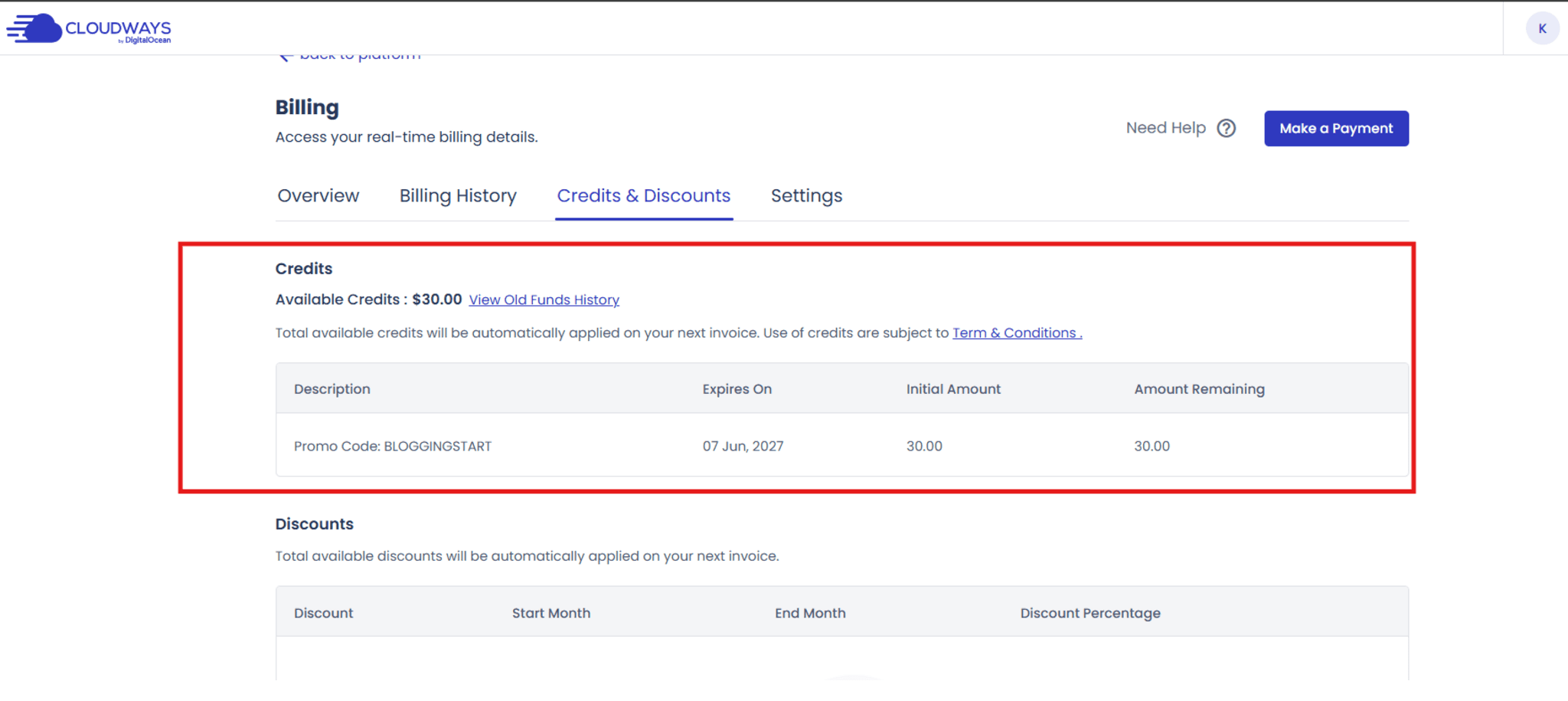
Personally tested BLOGGINGSTART $30 credit proof
The free trial itself does not need a coupon code. On July 23, 2026, I separately tested BLOGGINGSTART in my Cloudways account.
- Cloudways accepted
BLOGGINGSTARTduring signup. - Billing → Credits & Discounts showed an initial and remaining balance of $30.
- My test account showed an expiry date of June 7, 2027.
How to read this proof: it shows what happened in my account on the test date. It does not guarantee the same credit or expiry for every new user, so verify your own Credits & Discounts screen.
Personally tested July 23, 2026BLOGGINGSTART
Copy $30 Code & ContinueCopy the code, then verify the actual benefit in your own Cloudways account.
After the free period
What happens if you keep Cloudways?
If you keep Cloudways after the trial, the cost depends on the product and configuration you choose. Flexible is billed hourly, and Cloudways currently shows an entry plan equivalent to $11/month. Its pricing page currently lists Autonomous Growth at $99/month.
Those are reference prices, not a promise of your final bill. Before upgrading, check the exact plan in your account and include any bandwidth, storage or add-ons you actually need.
Check Current Cloudways Pricing →Decision ruleTest first
Judge the trial on your real website, then compare the complete paid cost—including backups, bandwidth and add-ons you actually need.
Cloudways may suit you if…
- You want to test managed cloud hosting without a card
- You run WordPress, WooCommerce or a supported PHP application
- You can spend three focused days evaluating a real site
- You want more control than typical shared hosting
- You are willing to compare the paid configuration after testing
Skip the trial if…
- You need permanently free hosting
- You need weeks to evaluate a host
- You expect every paid add-on to be included
- You need staff-managed migration before upgrading
- You only want a simple all-in-one shared-hosting bundle
Bottom line
Use the trial to answer a few real questions
Three days is enough to check setup, migration, dashboard workflow and short-term performance. It is not enough to prove long-term uptime or support quality. If those first tests go well, use the paid hourly model for a longer evaluation before moving a critical site.
Quick answers
Cloudways free trial FAQs
Does Cloudways have a free trial?+
Yes. Cloudways currently offers separate 3-day trials for Flexible and Autonomous. Neither requires a credit card to begin.
When does the 3-day trial start?+
For Flexible, Cloudways says the timer starts when the trial server is created. Prepare your backup and testing checklist before you launch it.
What is the difference between Flexible and Autonomous?+
Flexible gives you more control over the server and applications. Autonomous is built for WordPress and WooCommerce with infrastructure and autoscaling handled for you.
Can I migrate a website during the trial?+
Yes, you can test a self-service migration. Cloudways' managed migration service is available after you move to an active paid plan.
Will Cloudways charge me automatically after the trial?+
A new no-card trial has no payment method to charge. Cloudways says an Autonomous trial can auto-upgrade only if a valid payment method was already on the account before the trial started.
What happens when the Flexible trial ends?+
To keep the Flexible server, upgrade the account and add a valid payment method. Flexible is then billed on a pay-as-you-go basis.
Can the Autonomous trial end early?+
It can stop working if you exhaust the trial's limited resources. Cloudways then requires you to upgrade before continuing.
Is BLOGGINGSTART part of the free trial?+
No. The trial and the promo code are separate. I tested BLOGGINGSTART on July 23, 2026 and saw a $30 credit in my account, but current eligibility, value and expiry can vary.
How this page was checked
Current terms first, firsthand proof second
This guide is written by Md Noman Miah. I rechecked the current Flexible and Autonomous trial rules, migration limits, Autonomous trial allowances and pricing on September 19, 2026.
The BLOGGINGSTART screenshot is different: it is firsthand evidence from July 23, 2026. I keep the original test date visible because promo-code eligibility can change.